1. Audio 模块概览

到目前为止,我们已经用过的模块有 window,graphics 和 system 。window 模块主要用来操作窗口以及设置窗口的属性,graphics 模块为我们在屏幕绘制图形提供了一系列方便的api,在system 模块我们用到了 Time 类和 Class 类。

SFML 中还有两个模块 --- audio 以及 network,后续会会慢慢介绍。

在 audio 模块中,我们必须掌握的两个类是 Sf::Sound 和 sf::Music。字面意思,两个类都是能够播放一个音频文件的。下面来简单介绍一下两者:

2. Sound 与 Music

实际上,这两个类的目的是不一样的,主要是因为它们的实现方式不一样。

Sound 类会将音频文件的数据全部加载到内存中,因此它的速度是很快的。

Music 类则是在打开了一个流连接文件所在的位置,它每次只会加载一部分的数据。因此,Music 类播放音频的时候会存在播放延时。

显然,由于这个特性,这两个类的应用场景有所不同。Sound 类会占用较多的 RAM ,而 Music 占用的 RAM 会很少。根据需求使用不同的类,主要是看音频文件的大小。

下面是它们的继承关系,
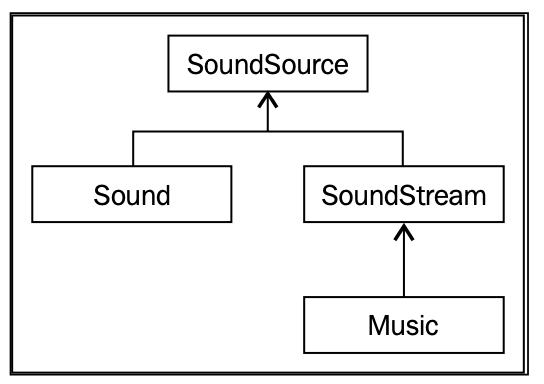
Sound versus Music
Sound versus Music

3. Audio 实战

音频由两个类的组合来表示,分别是 Sound 和 SoundBuffer。 SoundBuffer 将音频资源保存在内存中,而 Sound 则是解析 SoundBuffer 中的资源并播放。类似前面提到的使用 Sprite 解析 Texture 资源。

下面的例子展示了这一用法:

1
2
3
4
5
6
7
8
9
10
11
12
13
14
15
16
#include <SFML/Audio.hpp>
#include <SFML/Window.hpp>

int main(int argc, char * argv[]) {
sf::Window window(sf::VideoMode(640, 480), "Audio");

sf::SoundBuffer sBuffer;
if (!sBuffer.loadFromFile("../res/mySound.ogg"))
return -1;
sf::Sound sound(sBuffer);

while (window.isOpen()) {

}
return 0;
}

支持的音频文件格式有:OGG, WAV, FLAC 等等,注意:由于版权原因,这里不支持 MP3 格式的音频。

如果需要播放音频的话,则调用 Sound::play() 方法。另外,所有继承自 SoundSource 的类都有一个表示状态的枚举类型 SoundSource::Status (enum),它包含 Stopped, Paused, or Playing 这三种状态。getState() 方法可以获取 Sound 实例的当前状态。

常用的方法:

  • Sound::stop() 停止音频,且播放位置会被重置
  • Sound::pause() 暂停音频,不会重置播放位置
  • Sound::setLoop() 当它为真的时候,音频将会循环播放
  • Sound::setPlayingOffset() 设置音频的播放位置

3.1 AssetManager 2.0

还记得前面实现过的 AssetManager 吗?现在我们将音频资源也加入管理,如下

1
2
3
4
5
6
7
8
9
10
11
12
13
14
15
16
17
18
19
20
21
22
23
#ifndef ASSET_MANAGER_HPP
#define ASSET_MANAGER_HPP

#include <SFML/Graphics.hpp>
#include <SFML/Audio.hpp>
#include <map>

class AssetManager
{
public:
AssetManager();

static sf::Texture& GetTexture(std::string const& filename);
static sf::SoundBuffer& GetSoundBuffer(std::string const& filename);

private:
std::map<std::string, sf::Texture> m_Textures;
std::map<std::string, sf::SoundBuffer> m_SoundBuffers;

static AssetManager* sInstance;
};

#endif

对应的方法实现:

1
2
3
4
5
6
7
8
9
10
11
12
sf::SoundBuffer& AssetManager::GetSoundBuffer(std::string const& filename) {
auto& sBufferMap = sInstance->m_SoundBuffers;

auto pairFound = sBufferMap.find(filename);
if (pairFound != sBufferMap.end()) {
return pairFound->second;
}

auto& sBuffer = sBufferMap[filename];
sBuffer.loadFromFile(filename);
return sBuffer;
}

有了这个之后,可以通过以下方式使用音频文件:

1
2
3
4
5
6
7
8
9
10
11
12
13
// example_8_1.cpp
int main(int argc, char * argv[]) {
sf::Window window(sf::VideoMode(640, 480), "Audio");
AssetManager manager;

sf::Sound sound(AssetManager::GetSoundBuffer("../res/mySound.ogg"));
sound.play();

while (window.isOpen()) {

}
return 0;
}

3.2 sf::Music

使用 Music 类播放音频如下:

1
2
3
4
sf::Music music;
if (!music.openFromFile('myMusic.ogg'))
return -1;
music.play()

调用 play() 方法会以一个单独的线程运行,因此不用它会阻塞当前线程。

4. sf::SoundSource 和 3D 音效

使用 SoundSource::setVolume() 可以设置音量,支持的音量值从 0(静音)到100(最大音量),默认值都为100。我们可以使用SoundSource :: getVolume()获取当前音量。

如何将声音以空间化的方式呈现出来,也就是说,如果有一个爆炸音效发生在游戏角色的左侧,那么玩家的左耳听到的声音应该要大一些。接下来简单实现一下

4.1 设置 listener

SFML 为我们提供了一个静态类 sf::Listener 来设置我们的 Listener。有三个属性可以设置,分别是 position(位置), orientation(方向), and global volume(音量大小)

Listener::setPosition() 需要传入一个三维向量参数,作用是设置 Listener 的位置, 默认声音的产生是在三维空间中的,对于 2D 游戏,可以将 z 轴设置为 0。

1
2
3
4
5
6
sf::Sprite heroSprite(AssetManager::GetTexture("myhero.png"));

while (window.isOpen()) {
sf::Vector2f heroPos = heroSprite.getPosition();
sf::Listener::setPosition(heroPos.x, heroPos.y, 0);
}

Listener::setDirection() 同样需要传入一个三维向量参数,作用是设置 Listener 的朝向。示例代码如下:

1
2
3
4
5
6
7
8
9
10
#define PI_RADIANS 3.1415f
#define PI_DEGREES 180.f

sf::Sprite heroSprite(AssetManager::GetTexture("myHero.png"));

while (window.isOpen()) {
float heroRot = heroSprite.getRotation() * PI_RADIANS / PI_DEGREES;

sf::Listener::setDirection(std::cos(heroRot), std::sin(heroRot), 0);
}

5. sf::Text 的使用

文本是游戏中最容易被忽视的功能之一,但有时对于游戏体验来说也是必不可少的,例如,使用正确的字体和大小,显示适当的信息量等等。 有些游戏甚至不会设置字体,但是很少见。 我们将讨论文本(text)和字体(font)。

使用特定字体(font)设置文本(text),如下:

1
2
3
4
5
6
sf::Font font;

if (!font.loadFromFile("awesomeFont.ttf"))
return -1;

sf::Text text("Look at my awesome font", font);

使用 RenderWindow::draw() 方法可以将 text 绘制到窗口中。

text 常用的方法有:

  • Text::setColor() 设置 text 的颜色
  • Text::setStyle() 设置 text 的各种属性,例如 Text::Style::Regular, Text::Style::Bold, Text::Style::Italic, 以及 Text::Style::Underlined

5.1 AssetManaget 3.0

将 Font 类加入到我们的资源管理类中,如下:

1
2
3
4
5
6
7
8
9
10
11
12
13
14
15
16
class AssetManager
{
public:
AssetManager();

static sf::Texture& GetTexture(std::string const& filename);
static sf::SoundBuffer& GetSoundBuffer(std::string const& filename);
static sf::Font& GetFont(std::string const& filename);

private:
std::map<std::string, sf::Texture> m_Textures;
std::map<std::string, sf::SoundBuffer> m_SoundBuffers;
std::map<std::string, sf::Font> m_Fonts;

static AssetManager* sInstance;
};

AssetManager::GetFont() 方法的实现:

1
2
3
4
5
6
7
8
9
10
11
12
sf::Font& AssetManager::GetFont(const std::string& filename) {
auto& fontMap = sInstance->m_Fonts;

auto pairFound = fontMap.find(filename);
if (pairFound != fontMap.end()) {
return pairFound->second;
}

auto& font = fontMap[filename];
font.loadFromFile(filename);
return font;
}

可以支持的 font 文件类型有:TrueType (TTF), Type 1, CFF, OpenType, SFNT, X11 PCF, Windows FNT, BDF, PFR, and Type 42

6. 最后

本文主要介绍了 SFML 中 Audio 模块的基本用法。后面也简单介绍了一下 text 和 font 的问题。

接下来将会介绍 SFML 中关于 network 模块的用法。😁